
You might have student loans if:
- You attended any program after you received your high school diploma or GED, including:
- a college or university;
- a career or trade school, like cosmetology school or automotive training; or
- a certificate training program, like business certificate programs, HVAC certificates, online programs for medical coding and billing certification, and more.
- You are a parent who took on a federal student loan to help pay for your child’s education.
Do you have federal student loans?
You might have federal student loans, private student loans, or both. But, MOST people have federal student loans.
- Federal student loans are made through federal government programs and are typically owned or insured by the U.S. Department of Education.
- Private student loans are made by other lenders, like banks and states, and are less common.
Information you need to know about your federal loans:
- Your federal loan type – different loan types have different terms and repayment options.
- Your loan servicer – the company that manages your student loans and who you send payments to.
- Your loan status – whether your loans are in repayment, in default, or whether your payments are temporarily paused through a forbearance, deferment, or grace period.
Pro Tip: Even if you know who your student loan servicer is, you should still log in to studentaid.gov to check. Some borrowers have more than one servicer.
Learn more on studentloanborrowerassistance.org about your federal student loan type, servicer, and status.
How to check if you have federal loans and where to find important information:
You can check if you have federal student loans either online or over the phone.
Option 1: Online
Step 1. Visit studentaid.gov and find “Log In” or “Create Account.”
Step 2. Sign in to your existing account or create a new studentaid.gov account and sign in.
Step 3. Once you sign in, you will see your “Dashboard.”
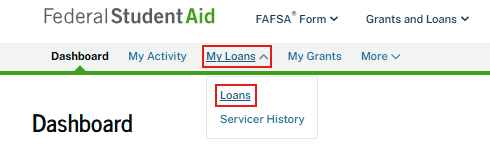
Step 4. Click on the “My Loans” section of your Dashboard and select “Loans” from the dropdown.
Step 5. If you have loans listed on the “My Loans” page then you have federal student loans.
If your loans are in default, a red banner will appear on your dashboard when you log in. If you see this banner, don’t wait! Take steps to get your loans back into good standing today. Learn more about default and your options on studentloanborrowerassistance.org.
A step by step guide on where to find what type of federal loans you have and your loan status is on studentloanborrowerassistance.org.
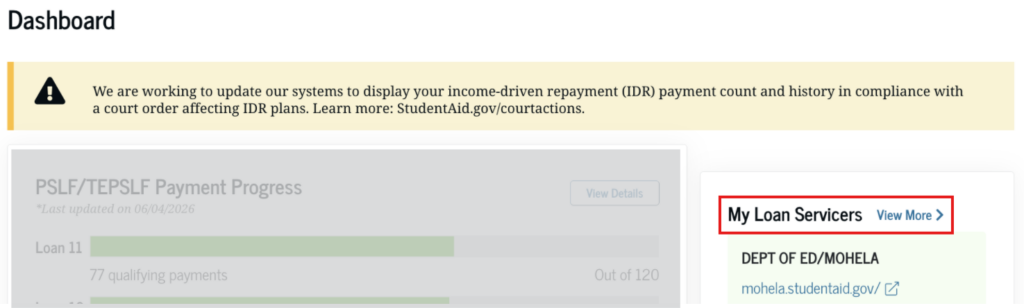
Step 6. You can also check which servicers manage your loans on the Dashboard.
Option 2: Over the Phone
You can call Federal Student Aid Information Center (FSAIC) at 1-800-4 FED AID to learn:
- If you have federal student loans
- What types of federal student loans you have
- What the status of your student loans are
- Who your loan servicer is
- And more!
Learn more about what to expect when calling FSAIC on studentloanborrowerassistance.org.
Need additional help? Visit studentloanborrowerassistance.org for more information about managing your student loans and to find help.
