
There are different ways to find your student loan information depending on whether you have federal or private student loans. It may be hard to tell at first glance if you have a private or a federal loan because many private student loan lenders also manage and service federal student loans. You may also have both federal and private student loans.
- How can I find my federal student loans on studentaid.gov?
- How can I find what types of federal student loans I have?
- Where do I find who my servicer is?
- Where do I find the status of my loans?
- Where do I find what repayment plan I am in?
- How else can I find out what federal student loan types I owe?
- How can I find my private student loan information?
How can I find my federal student loans on studentaid.gov?
The first thing you should do is log in to your account on studentaid.gov. Any loans listed on your studentaid.gov account are federal student loans. From your Dashboard, you can navigate to see the status of your loans (in repayment, grace period, forbearance, deferment, delinquent, or in default), what repayment plan you are in if you’re in repayment, and who your loan servicer is.
Setting up an account on studentaid.gov
If you have forgotten your login information, it’s easy to reset! Studentaid.gov will use the email address or phone number it has on file to reset your information. If you don’t have access to this email address or phone number anymore, call FSAIC to reset your login information.
How can I find what types of federal student loans I have?
It is important to know exactly what types of federal student loans you have, because some loan benefits are only available for certain types of federal loans. More information on different student loan types is here.
When you log into studentaid.gov, and go to the My Loans section, you’ll be able to see if you have subsidized loans, unsubsidized loans, graduate loans, consolidation, Perkins loans or Parent PLUS loans. But, if you took out loans from before 2010, you will need to check directly with your servicer or call FSAIC to see which of your loans are Direct or FFEL loans. Subsidized and unsubsidized loans, graduate loans, and Parent PLUS loans can all be either Direct or FFEL loans.
See your loan details
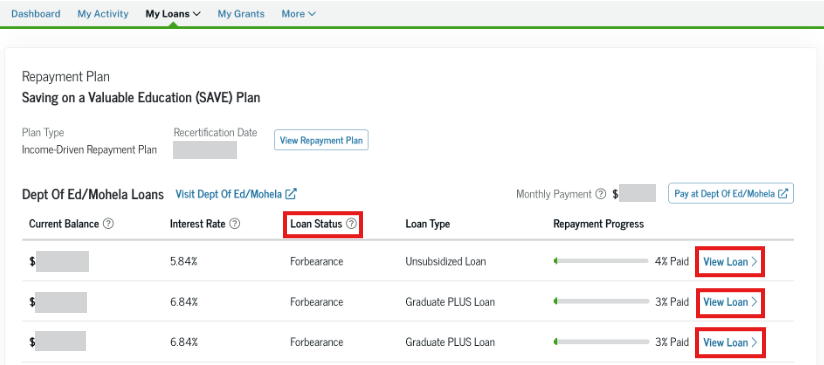
To see an overview of your loans, click on “My Loans” in the menu bar and choose “Loans” from the dropdown. Scroll down to the “Loan and Repayment Information” section, where you’ll see a list of your loans split up by “Repayment Plan.” This list will include loans you paid off or consolidated into a new loan. Click “View Loan” next to each loan listed on this page to learn more specific information about each loan.
Where do I find who my servicer is?
You can find out who services your loans in two places.
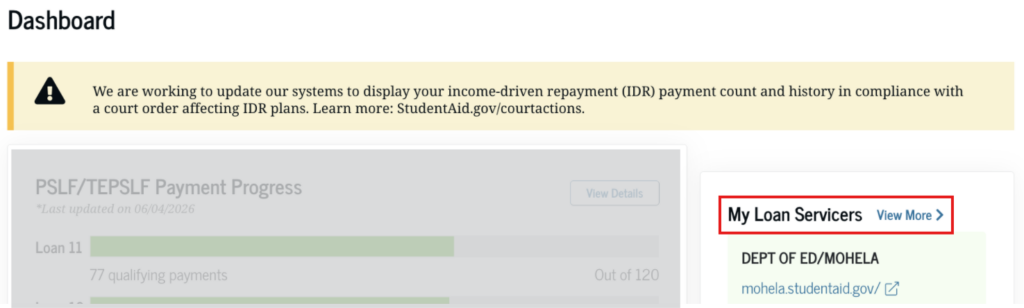
From the Dashboard, there is a box on the top right hand corner that says “My Loan Servicers.” If you click “view more,” all of the loan servicers that are servicing outstanding loans will be listed.
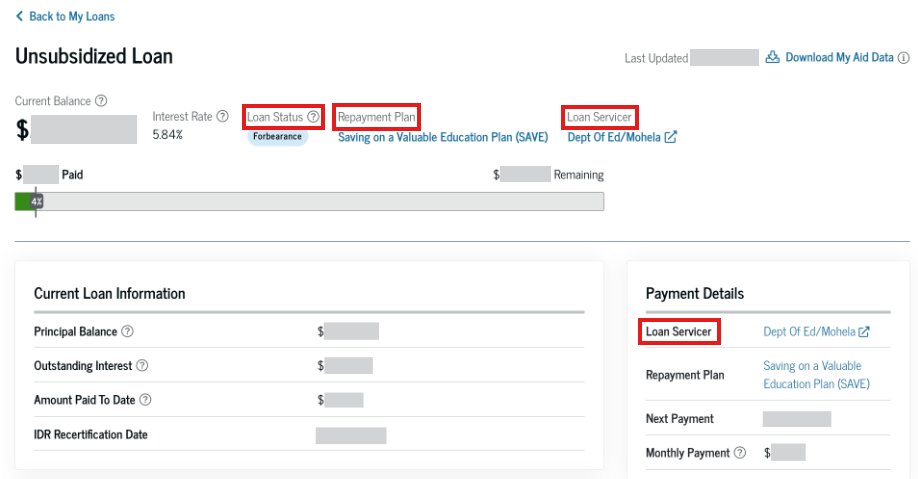
In addition, you can see servicer information by clicking “view loan” next to each federal loan listed on your “my loans” page. Your servicer will be listed there. Studentaid.gov will link directly to your service’s website from this page.
Some borrowers have more than one servicer, depending on what kinds of loans they borrowed and when they borrowed loans. In addition, the Department of Education can switch who your loan servicer is. So, make sure you check who your loan servicer is.
Where do I find the status of my loans?
If your loans are in default, a red banner will appear on your dashboard when you log in. If you see this banner, don’t wait! Take steps to get your loans back into good standing today. Learn more about default and your options on our Default & Debt Collection page.
You might be in repayment, in a grace period, in forbearance, in deferment, delinquent, or in default. You need to know the status of your loan so that you know if you need to take action to get your loans in good standing. You can see the status of each of your loans on the “My Loans” page of your studentaid.gov account.
Where do I find what repayment plan I am in?
Loans on the “My Loans” page of your studentaid.gov account will be grouped based on repayment plan. You should click on “view loans” next to each of your loans to make sure you are getting the right information for each loan. Once you are on the individual loan page, you will see your repayment status, along with the repayment plan and loan servicer.
If you cannot afford your payments, you should consider enrolling in an income-driven repayment plan.
How else can I find out what federal student loan types I owe?
You can also find out about your federal student loans by calling the Federal Student Aid Information Center (FSAIC) at 1-800-433-3243. When you call, you will be connected to an automated system that will ask you a few questions about your loans before you are connected to a representative. Once connected to an FSAIC representative, they will be able to tell you whether you have federal student loans, whether your loans are in default, who your servicer is, and other basic information like the specific type of federal loans you have.
Tips for calling FSAIC
If you have federal student loans, FSAIC will have a phone number and email address on file. If you don’t remember which phone number or email address that you used, or no longer have access to them, don’t worry! There are other ways to identify yourself and learn about your loans over the phone.
Getting Connected to a Representative
To be connected to a representative immediately, stay on the line and allow the automated system to repeat the menu options three times. After the third time with no response, you will be connected directly to a live person.
How can I find my private student loan information?
Private student loans are not listed on studentaid.gov because they are not issued or managed by the federal government. If you know who your private loan servicer is, you can log in to your online account with the servicer or call your servicer to get your loan information.
Unlike federal loans, there isn’t a central place that stores all of your private student loan information. However, your private student loans may be listed on your credit reports. Because federal student loans are usually listed on your credit reports, too, it may be hard to tell if the loan listed is a federal loan or a private loan. If the loan is labeled as “Department of Education,”“DEPT of ED,” or “DEPTED,” it is likely that it is a federal loan, but not all federal loans are listed this way on a credit report.
Check your credit report for free
You can currently get a free copy of your credit report once a week from each of the big three credit reporting agencies at annualcreditreport.com.
Compare the loans listed on your studentaid.gov account with your credit report. Any loans that are listed on your studentaid.gov account are federal student loans. If any loans on your credit reports are not listed on your studentaid.gov account, they are probably private student loans.
Another way to tell if you have a private loan and to find your loan information is to look at any loan statements, collection letters, emails, or loan agreements you have. Common private student loan lenders include SoFi, Earnest, LendKey, Discover, and Citizens, but there are many other lenders that offer private student loans. Some student loan companies, such as NelNet and MOHELA, also service federal student loans, which can be confusing for borrowers who have federal student loans serviced by these companies.
If you find out that you do have a private student loan, you can get more information about your loan from your loan servicer. If you don’t know who your loan servicer is, the company’s name may be listed on your credit report or on emails or letters that you receive about the loan. You can also ask for a disclosure statement from the company, which should include important information about your private student loan.
If you need more help determining your loan situation, visit our Find Help page.
